


Download WorkinTool File Compressor – Free, Secure Batch Compression for Windows & Mac
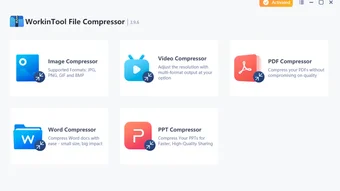
WorkinTool File Compressor is a powerful, user-friendly software designed to simplify file compression for individuals and professionals alike. Whether you're managing large video files, bulky PDFs, or high-resolution images, this tool enables efficient batch compression without sacrificing quality. With support for multiple file formats including MP4, JPEG, PDF, PPT, and DOCX, WorkinTool ensures your files are optimized for sharing, storage, and archiving.
The software delivers fast compression speeds, making it ideal for handling large volumes of files in minutes. Best of all, it operates without adding watermarks or altering the original content, preserving integrity while reducing size. Available for both Windows and Mac OS, WorkinTool File Compressor is a secure, reliable solution for anyone needing to shrink file sizes without compromise.
Download the free version today and experience seamless compression across your devices.
Effortless Batch Compression with High Efficiency
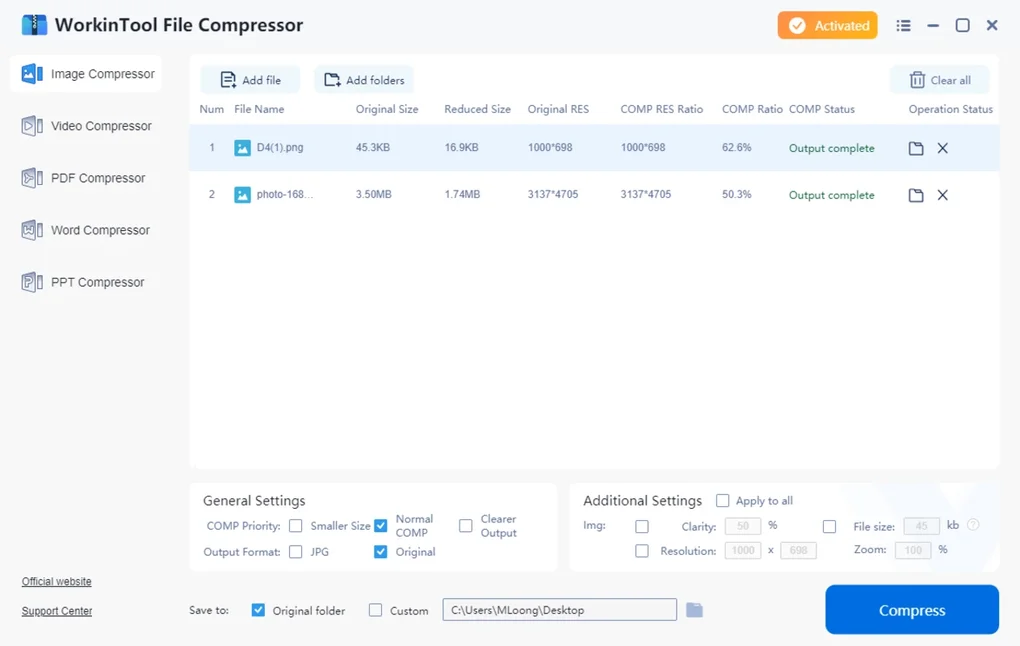
One of the standout features of WorkinTool File Compressor is its ability to handle batch processing with remarkable efficiency. Unlike traditional compression tools that require individual file handling, this software allows users to select multiple files at once and compress them in a single operation. This is particularly beneficial for professionals who frequently deal with large volumes of documents, presentations, or multimedia files. Whether you're preparing a project folder for email, backing up data, or uploading files to cloud storage, the batch compression feature saves significant time and effort.
The compression engine is built for speed and intelligence. It analyzes each file type and applies optimized algorithms tailored to the format—such as reducing video bitrate without visible quality loss or compressing images using advanced lossless techniques. This ensures that the output files are significantly smaller while maintaining readability and clarity. For example, a 500MB video can be reduced to under 200MB with minimal visual degradation, and a 20MB PDF can be trimmed to 5MB without losing text or image quality.
Another major advantage is the intuitive drag-and-drop interface. Simply drag your files into the application window, choose your compression level (Low, Medium, High), and click "Compress." The software runs in the background, allowing you to continue working on other tasks. Once complete, the compressed files are saved in a designated folder, ready for use. This simplicity makes WorkinTool File Compressor accessible even to non-technical users, while still offering enough customization for advanced users who want fine-grained control over compression settings.
Secure, Cross-Platform Compatibility & Privacy Protection
Security and privacy are paramount when handling sensitive files, and WorkinTool File Compressor delivers on both fronts. The software operates entirely offline—no data is uploaded to external servers—ensuring your files remain private and protected. This is especially important for businesses, freelancers, and individuals dealing with confidential documents, personal photos, or financial records. With no cloud processing involved, you can compress files with confidence, knowing they stay on your local device.
WorkinTool supports both Windows and Mac operating systems, making it a versatile choice for users across different platforms. Whether you're using Windows 10/11 or macOS Monterey/Ventura, the software installs smoothly and integrates seamlessly into your workflow. The installer is lightweight, typically under 50MB, and the setup process takes less than a minute. After installation, the app launches instantly and requires no complex configuration.
For users managing files across multiple devices, the consistent performance across platforms ensures a uniform experience. You can compress a folder on your Mac and access the compressed files on your Windows PC without compatibility issues. The software also supports common file formats like MP4, AVI, MOV, JPEG, PNG, PDF, DOCX, PPTX, and more. This broad compatibility means you’re not limited to a specific type of file—whether it’s a presentation for a client, a photo album for family, or a video project for social media, WorkinTool handles it all.
Key Features & Benefits of WorkinTool File Compressor
- Batch Compression – Compress multiple files simultaneously with a single click.
- Multiple Format Support – Works with videos, images, PDFs, Word, PowerPoint, and more.
- Lossless & Lossy Options – Choose between quality-preserving and size-reducing compression modes.
- Fast Processing Speed – Advanced algorithms ensure rapid compression without lag.
- Offline & Secure – No file uploads; all processing happens locally on your device.
- Customizable Settings – Adjust compression level, output folder, and file naming.
- Watermark-Free Output – Compressed files retain original appearance with no added marks.
- Intuitive Interface – Drag-and-drop functionality for effortless use.
Pros and Cons: A Balanced View
Pros
- Efficient batch processing saves time on large file sets
- High compression ratios without visible quality loss
- Secure, offline operation protects sensitive data
- Available for both Windows and Mac users
- Simple, clean interface suitable for beginners
- Free version offers robust functionality
- Supports a wide range of file types
Cons
- Advanced features like custom profiles are limited in the free version
- No built-in cloud sync or sharing integration
- Occasional delay in file scanning with extremely large folders
- Limited customer support for free users
Frequently Asked Questions (FAQ)
Conclusion: The Smart Choice for File Compression
WorkinTool File Compressor stands out as one of the most reliable and efficient tools for batch file compression on both Windows and Mac. Its combination of speed, security, and ease of use makes it a top choice for students, professionals, and casual users alike. Whether you're reducing the size of a video for email, optimizing a PDF for online submission, or compressing a folder of images for backup, this software delivers consistent results without compromising quality.
With no watermarks, full offline operation, and support for a wide array of file types, WorkinTool offers a secure and hassle-free experience. The free version is impressively capable, making it accessible to everyone. For those needing more advanced features, the paid upgrade provides additional customization and priority support.
If you're looking for a fast, safe, and user-friendly way to compress files in bulk, download WorkinTool File Compressor today. It’s a must-have tool for anyone who values efficiency, privacy, and quality in their digital workflow.
Download WorkinTool File Compressor now and streamline your file management with confidence.







